How do I send reminders to members who have not paid their membership fee?

How do reminders work?

- Can ONLY be sent to people with outstanding membership fee


- The system checks itself who can receive reminders, based on members' payments via the SportMember app


- You can send an unlimited number of reminders


- Reminder does NOT act as a reminder fee (we do not charge an extra administration fee for sending payment emails as reminders)


- The administration fee is only added when the member does the actual payment transaction (NOT when you send the reminder)

Det er ikke noe svar på dette spørsmålet knyttet til bruken av SportMember fra appen.


Open Finance and Individual Payments

  1. Click on in the top left corner
  2. Click on  Payments
  3. Click on Created payments on the left

You will now see the payment summary and can choose to send a reminder to one person or even several people at once.

Reminder to one outstanding person

  1. Click on  in the Actions column in the same row as the member's name
  2. Choose between the two templates: Reminder 1 orReminder 2
  3. Add additional comment to the reminder email
  4. Finish with Send and a new payment email will be sent to the member

Note: Put the mouse on  to see when the last reminder was sent. You can send as many reminders as you want.

Reminder to several/all outstanding persons at once

  1. Select multiple reminders to the far left of the member's name (tick the box). Alternatively, tick the box at the top left of the Name column to select ALL PAYMENTS.
  2. Click on  in the Actions column in the blue row at the top
  3. The list of selected/all outstanding will be displayed. Select the intermediate templates
  4. Add additional comment to the reminder email
  5. Finish with Send and a new payment email will be sent to the member

    Note: Put the mouse on  to see when the last reminder was sent. You can send as many reminders as you want.


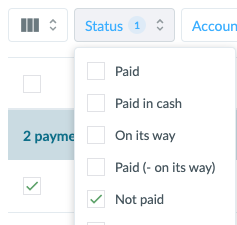
  • TIP: You may want to sort your filter first, so that you only see all outstanding amounts (because everyone with status Paid should of course not receive a reminder).
    Click Status and tick Not paid. You can also use Payment period and tick Last 6 months or maybe Last 12 months.


Var denne artikkelen til hjelp?
1 av 1 synes dette var nyttig

Klar til å komme i gang?

Klubben din på din måte! Administrer klubben din med SportMember og lette arbeidsbelastningen. Vi vil gjerne hjelpe deg i gang. Opprett en konto med en gang.
Hva koster det?
Hvilke behov har klubben din? Basis- eller PRO-abonnement?
Prisdetaljer
Funktionsoversigt
Ingen klubber er like. Våre funksjoner dekker dine behov.
Funktionsoversigt