How do I create coaches on teams?

Who can create coaches?

- A coach can create other coaches/team leaders and assistants on his/her team


- An assistant can create other coaches/team leaders and assistants on his/her team


- A team leader can only create other team leaders/assistants on his/her team


- As a club administrator you can create all coaches/assistants/team leaders on ALL teams
Det er ikke noe svar på dette spørsmålet knyttet til bruken av SportMember fra appen.

Open Members of the club

  1. Click on  Club in the top left corner
  2. Click on Members

You are now in the club member list and can choose to create a coach on a team or move/add a coach from another team.

Create a coach

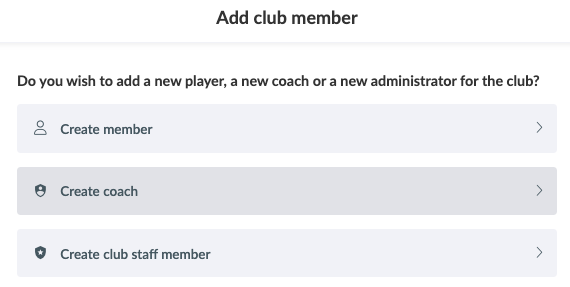
  1. Click on the green button Add member and then Create coach
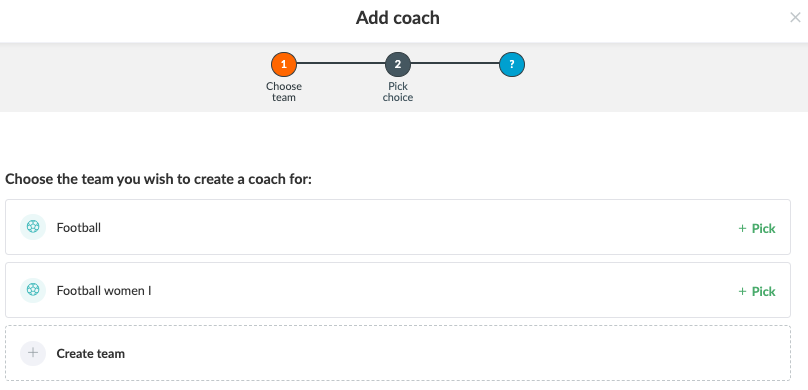
  2. Find the team you want to create the coach on and click  Select


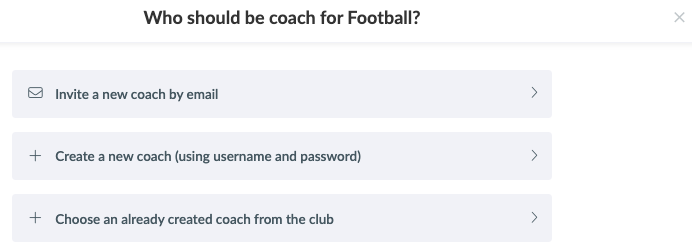
You now have three options:

  • Invite a coach by email
  • Create a coach using username and password
  • Select a coach from the club


Move/add a coach from another team

  1. Click on the "More" button in the top right corner and then Move or add coaches
  2. Do as in this guide


Var denne artikkelen til hjelp?
0 av 0 synes dette var nyttig

Klar til å komme i gang?

Klubben din på din måte! Administrer klubben din med SportMember og lette arbeidsbelastningen. Vi vil gjerne hjelpe deg i gang. Opprett en konto med en gang.
Hva koster det?
Hvilke behov har klubben din? Basis- eller PRO-abonnement?
Prisdetaljer
Funktionsoversigt
Ingen klubber er like. Våre funksjoner dekker dine behov.
Funktionsoversigt